Synthetic Monitoring
Synthetic Monitoring allows TPRM and operational resilience professionals to proactively track SLA and KPI compliance of their IT/ICT vendors through automated testing and continuous monitoring. This service performs recurring HTTP requests to specified URLs and validates that all configured conditions are satisfied, helping you maintain vendor accountability and regulatory compliance.
Synthetic Monitoring is most useful for tracking vendors who do not publish incident reports or status updates. For vendors that do publish incident information, see SLA Configuration.
Overview
Synthetic monitors continuously test the availability and performance of your vendor applications by simulating requests. If any condition is not met, the request is marked as failed, providing immediate visibility into vendor performance issues before they impact your operations.
Check Types
Clarative supports different types of synthetic monitoring to meet various compliance and operational needs:
- Availability Checks - Validate that the vendor application is accessible by checking HTTP status codes from requests to specified endpoints
- Performance Checks - Measure response times and validate performance against defined thresholds
- Content Validation - Verify that expected content is present in responses to ensure applications are functioning correctly
Each monitor can include multiple check types, and the monitor will report a failure if any configured check fails.
Creating a Synthetic Monitor
Step 1: Configure Basic Settings
- Navigate to Synthetic Monitoring: Go to the Performance Monitoring tab of your vendor and locate the Synthetic Monitoring section.
- Add New Monitor: Click Add to create a new synthetic monitor.
- Set Monitor Details:
- Name: Provide a descriptive name for your monitor (e.g., "Clarative App Monitor")
- Description: Add details about what the monitor tests (e.g., "Test the availability of Clarative's app")
- Owner: Assign responsibility for the monitor to a team member
Step 2: Configure Request Parameters
- URL: Enter the endpoint URL you want to monitor (e.g.,
https://app.clarative.ai/) - HTTP Method: Select the appropriate method (GET, HEAD)
- Request Headers: Add any required headers, e.g. for content type
- Authentication: Configure authentication headers if needed (e.g., Bearer tokens)
Step 3: Set Response Expectations
Configure the conditions that define a successful response:
- Acceptable Status Codes: Define which HTTP status codes indicate success (e.g., 200, 204, 302)
- Maximum Response Time: Set the acceptable response time threshold in milliseconds (e.g., 500ms)
- Response Content Validation: Specify text that should be present in the response to confirm the application is functioning correctly
- Expected Response Headers: Define required response headers and their expected values
Step 4: Test and Activate
- Send Test Request: Use the "Send Test Request" button to validate your configuration
- Review Results: Ensure the test passes with your current settings
- Save and Activate: Save your configuration and activate the monitor
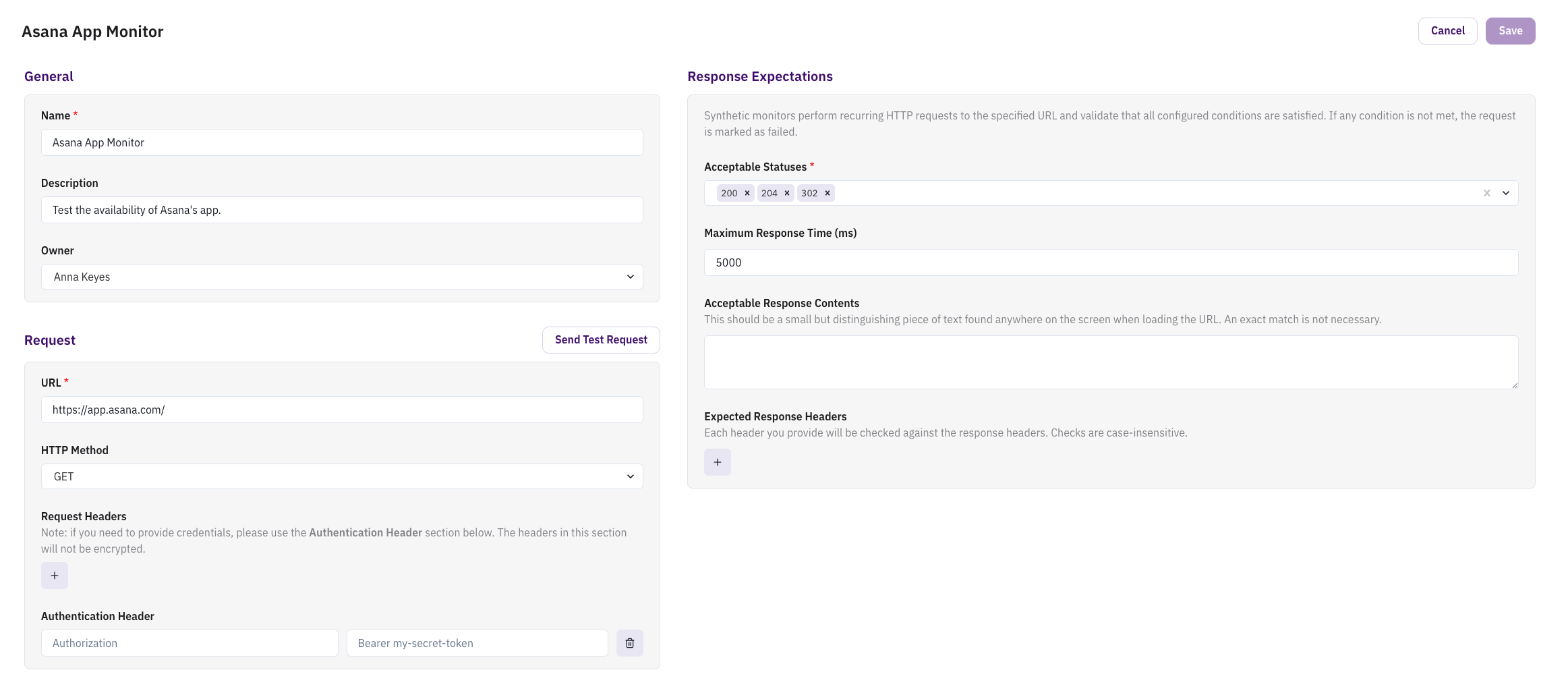
Monitor Configuration
- Set Realistic Thresholds: Configure response time limits that align with your SLA requirements
- Baseline Performance: Establish normal response time ranges for each vendor
- Geographic Considerations: Consider network latency when setting response time expectations
- Regular Review: Periodically review and update monitor configurations as vendor services evolve
Content Validation
- Unique Identifiers: Use specific text that's unlikely to appear in error pages
- Minimal but Distinctive: Choose small but distinguishing pieces of text for validation
- Avoid Volatile Content: Don't rely on content that changes frequently (dates, user-specific information)
Troubleshooting
Common Issues
Monitor Shows as Failed
- Verify the URL is accessible and correct
- Check that authentication headers are properly configured
- Ensure acceptable status codes include the actual response codes
- Validate that expected content is present in the response
High Response Times
- Check if the vendor is experiencing performance issues
- Consider adjusting response time thresholds if they're too restrictive
Authentication Failures
- Verify authentication tokens are current and valid
- Check that authentication headers are correctly formatted
- Ensure credentials have appropriate permissions for the monitored endpoint
Use Cases
Synthetic monitoring supports compliance with various regulations and best practices:
- DORA (Digital Operational Resilience Act): Provides continuous monitoring of critical ICT services
- Vendor Risk Management: Demonstrates proactive monitoring of vendor performance
- SLA Compliance: Automated tracking of vendor uptime and performance commitments
- Operational Resilience: Early detection of vendor service disruptions
Need Help?
Contact support at support@clarative.ai for assistance with configuration or troubleshooting.